
The family shopping list
"Get milk on your way home": forgotten by the time you're in the aisle. With YouTim, everyone adds items as they think of them, the shopper checks off what's taken. No duplicates, no forgetting.
YouTim Service
Shopping, tasks, to-dos, gift ideas: everyone adds, everyone checks off. Synced automatically, even offline, ad-free, no complex setup.
No more duplicate lists on every phone.
Anyone adds, checks, deletes — the list updates for all members.
Assign one or more people to each item, then filter the list by participant to see what's waiting for each person.
Give an item a date, and a time if needed; mark it as high priority. Anything overdue shows up in red.
Every day, every week, every month… Once ticked off, the item comes back on its next date.
On time, 10 min or 1 h before, or the day before: the reminder goes to the people assigned (or the organisers).
Shopping, tasks, "vacation packing": as many lists as needed in the same YouTim.
Free editing for all or admin-restricted, depending on context (family vs. association).
Add and tick items even without signal: everything is sent once you're back online.
Discuss an item in the same YouTim's Chat — no need to switch apps.
How it works
Add items; if needed, tap the sliders to give them a date, one or more people, a priority, a repeat or a reminder. Tick them off when done: whatever repeats comes back on its next date. Filter by participant, and keep going even offline. You can have several lists in the same YouTim.
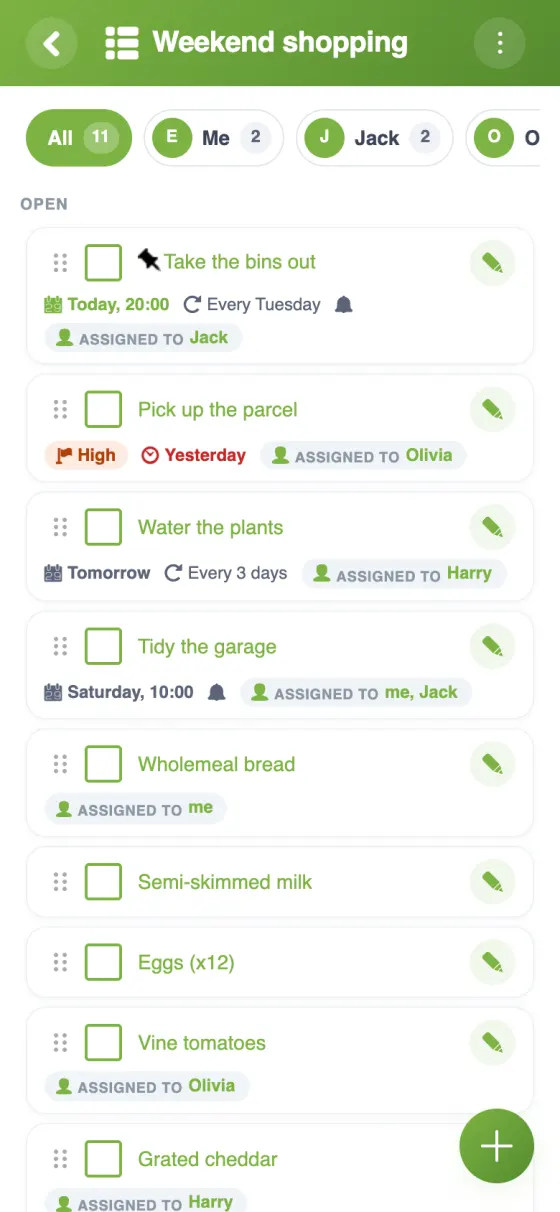
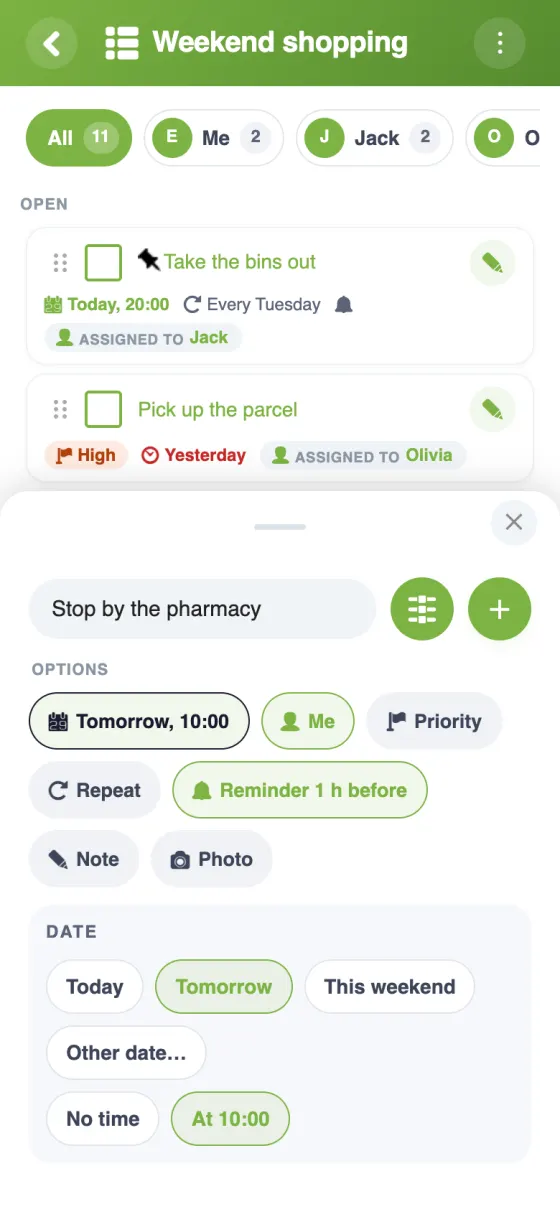
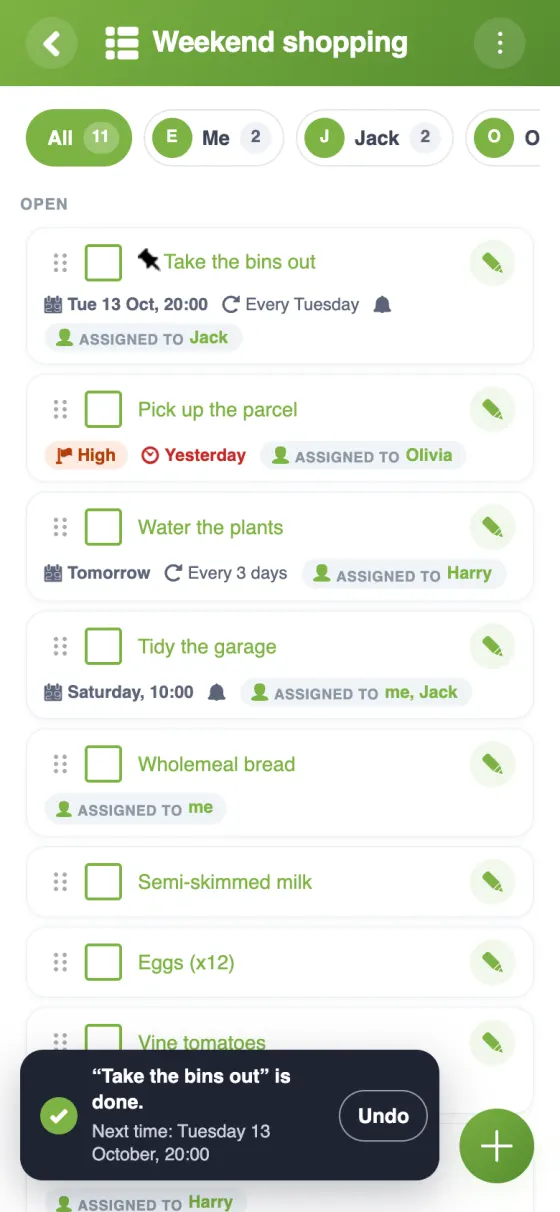
A shared list built into the group, instead of yet another standalone app.
| Feature | YouTim Lists | AnyList / Bring | Shared Google Keep |
|---|---|---|---|
| Collaborative editing | ✓ | ✓ | ✓ |
| Member assignment | ✓ | depends | ✗ |
| Multiple lists per group | ✓ | ✓ | ✓ |
| Tied to chat and calendar | ✓ | ✗ | ✗ |
| No Google account / dedicated app | ✓ | dedicated app | Google account |
| Ad-free | ✓ | free tier | ✓ |
| GDPR & EU | ✓ | depends | US |
Comparison for informational purposes, based on publicly known 2026 features.
Six everyday uses where a collaborative list saves time.
"Get milk on your way home": forgotten by the time you're in the aisle. With YouTim, everyone adds items as they think of them, the shopper checks off what's taken. No duplicates, no forgetting.
Vacuuming, dishes, bathroom: assign each task to a family or roommate member. Everyone sees who does what this week.
Beach gear, meds, chargers, IDs: a shared list prevents "I forgot…" moments in the loaded car.
Prepping for the holidays or a birthday: the shared list lets everyone suggest without duplicates. Pair with Fund for a shared gift.
Event prep, AGM organization: a task list assigned to each volunteer keeps everyone informed.
For a wedding, move, association launch: all "to-dos" in one place, shared among organizers, no spreadsheet or email.
Yes, completely free, with no in-app purchases and no ads.
By default, all members add, edit, delete and check off items. The admin can restrict these rights to admins, or lock the list.
Yes: an item can have one or more people in charge, who get a notification if the option is turned on in the list. Only those people, or an admin, can then check it off. A filter by participant shows what's waiting for each person.
Yes: when adding an item, tap the sliders to give it a date (and a time), one or more people, a priority, a repeat (every day, every week, every month…) or a reminder. The reminder goes to the people assigned; if nobody is, to the organisers (or to everyone, depending on the list's setting). A repeating item stays in the list once ticked off and comes back on its next date.
The list lives in the same YouTim as the chat, calendar and budget: the members are already there, with no new sharing to set up. Each item can have a photo, a date with a reminder and several people in charge.
In the app, yes: when someone adds or checks off an item, the list updates for everyone else. On the web, it updates when you come back to the page.
Yes: without a connection, you can add, check off, rename or reorder items. Everything is sent automatically as soon as the network is back.
Yes, you can add several lists to the same YouTim — for example “Shopping”, “Chores” and “Vacation packing”.
Sharing a list with a group shouldn't require installing a dedicated app like AnyList or Bring, or creating a Google account for Keep. YouTim Lists lives in the same group as chat and calendar, with the same members already invited.
An active family doesn't have time to juggle 5 apps. One shared family list with shopping, weekend chores and home to-dos saves precious minutes every day.
Shopping rotation, cleaning, bills: the shared roommate list paired with the budget turns daily life management into something simple and fair.
Association volunteers get their assigned tasks and check them off as they go. The coordinator sees progress at a glance, no email follow-ups.
"To pack", "to buy on-site", "places to visit": as many lists as needed in the trip's YouTim. Pair with Itinerary and Budget.
Lists stay private to the group, hosted in Europe. No targeted advertising based on your shopping content.