YouTim Service

The private group chat,
built for real life

Messages, photos, emoji reactions and targeted replies — kept to the people you invite. No ads, no algorithm, no crowd.

A chat that stays between you

Every YouTim conversation is private. No public profile, no likes from strangers, no targeted ads. You decide who joins — and only they can read and write.

  • 💬

    Messages and photos

    Write, share up to 10 photos per message or a voice message: everything stays in one place.

  • 😄

    Emoji reactions

    Long-press a message to open the emoji palette: 👍 ❤️ 😂 😮 😢 🎉. One reaction per person, changeable anytime.

  • ↩️

    Targeted replies

    Reply to a specific message so you don't lose the thread when several topics run in parallel.

  • 🔔

    Notifications

    A push notification for every message, and a daily e-mail recap if you want it.

  • 🛡️

    Private by default

    No public profile, no algorithm, no ads. Your chats stay between invited people.

  • 🤝

    One group, every tool

    Add polls, calendar, budget or lists to the same group — same members, zero reconfiguration.

How it works

Your group's private chat thread.

Write, send photos or voice messages, reply to a specific message and react with an emoji. Everything stays in one place, for members only, instead of getting lost in ten conversations.

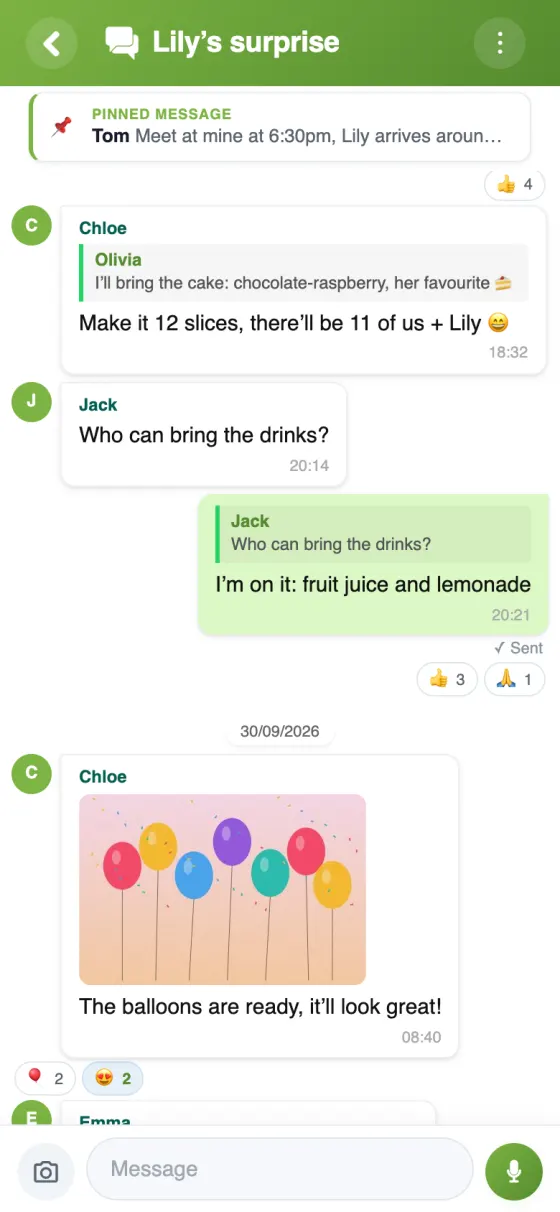
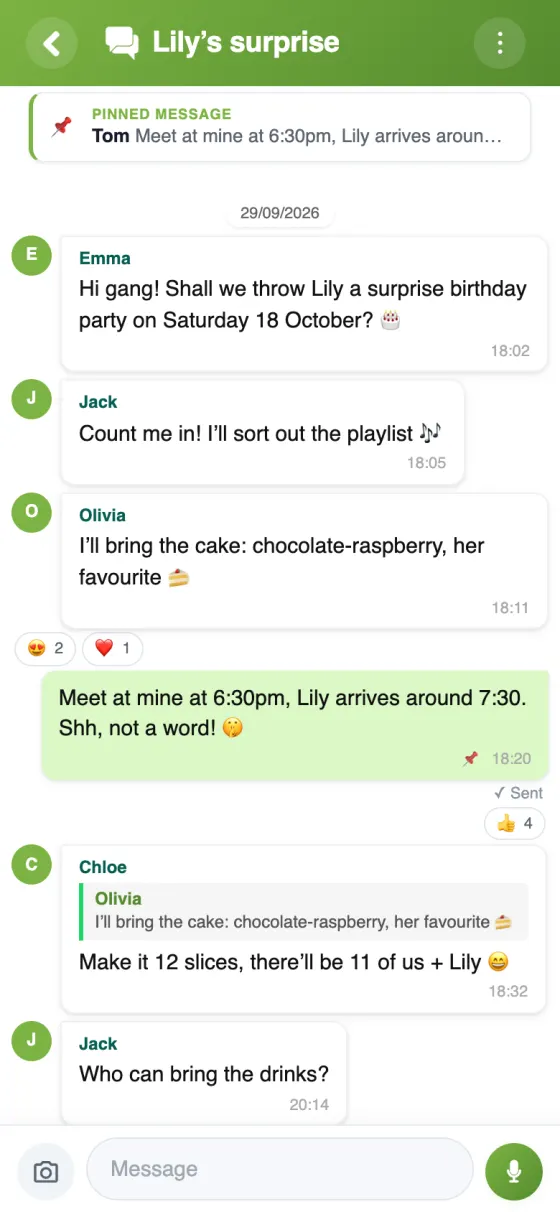
Chat — The group get organised, pinned message on top
Step 1The group get organised, pinned message on top
Chat — Quoted replies and reactions in one tap
Step 2Quoted replies and reactions in one tap
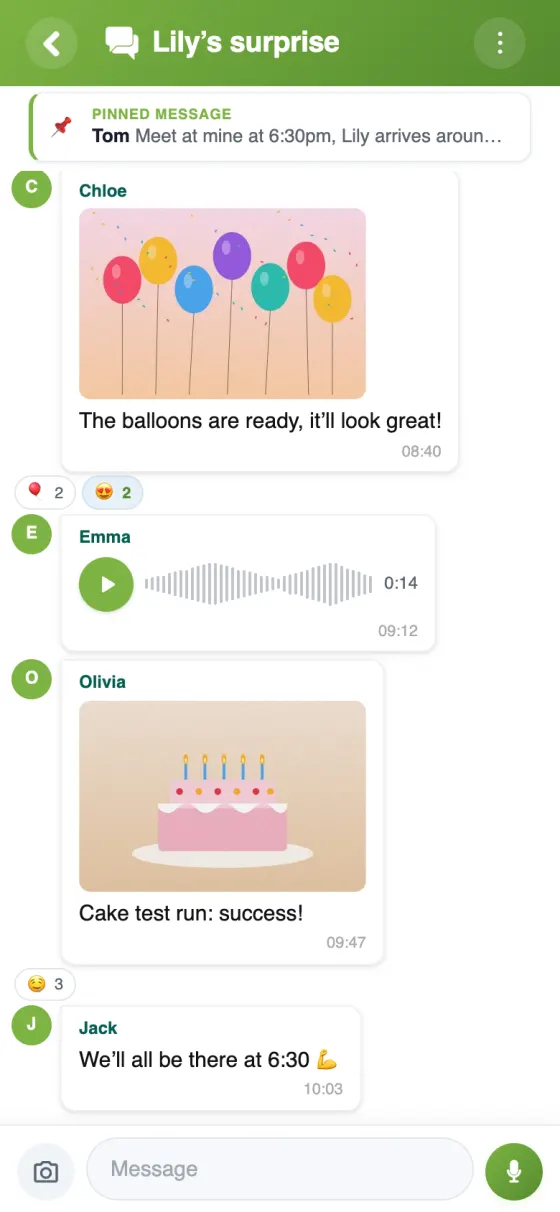
Chat — Photos and voice messages in the thread
Step 3Photos and voice messages in the thread

A live chat preview

Here's what a real YouTim conversation looks like — reactions, replies, photos and notifications, all included.

Private messages

One-to-one or in a group, privately.

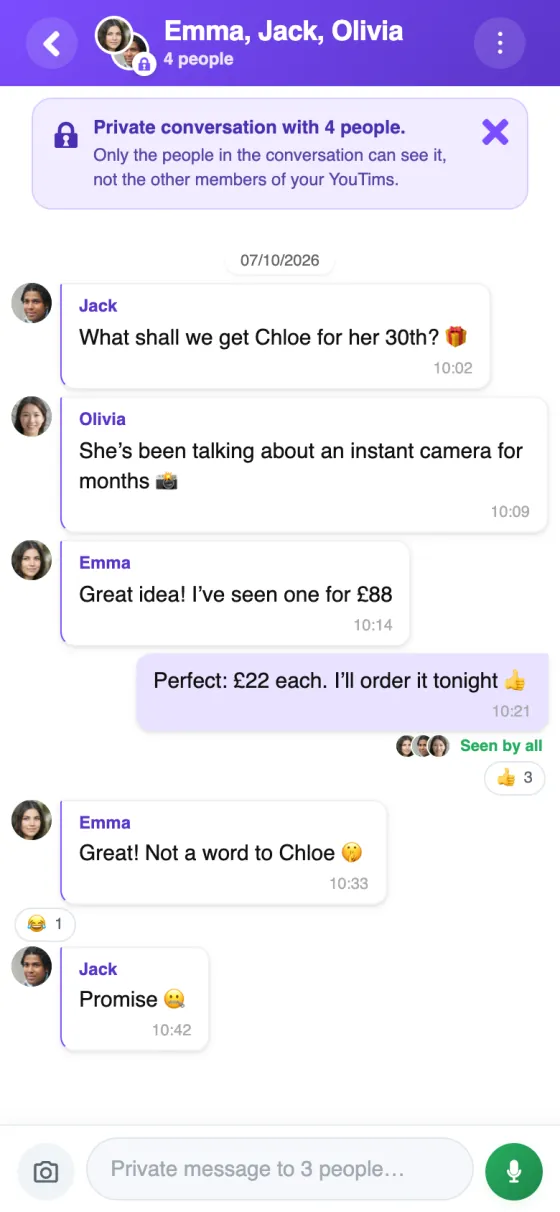
Outside the group chat, write to one person or to several. Only the people in the conversation can see it, not the other members of your YouTims.

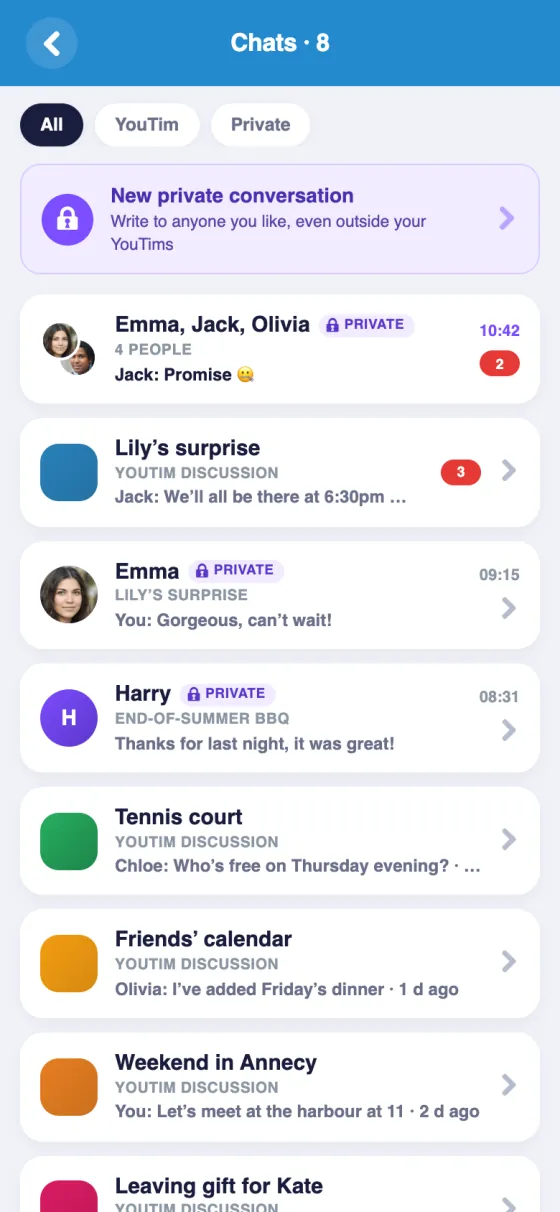
“Chats” page in the app: private conversations and YouTim chats, with All, YouTim and Private filters
ChatsYour private conversations, alongside your YouTims’ chats
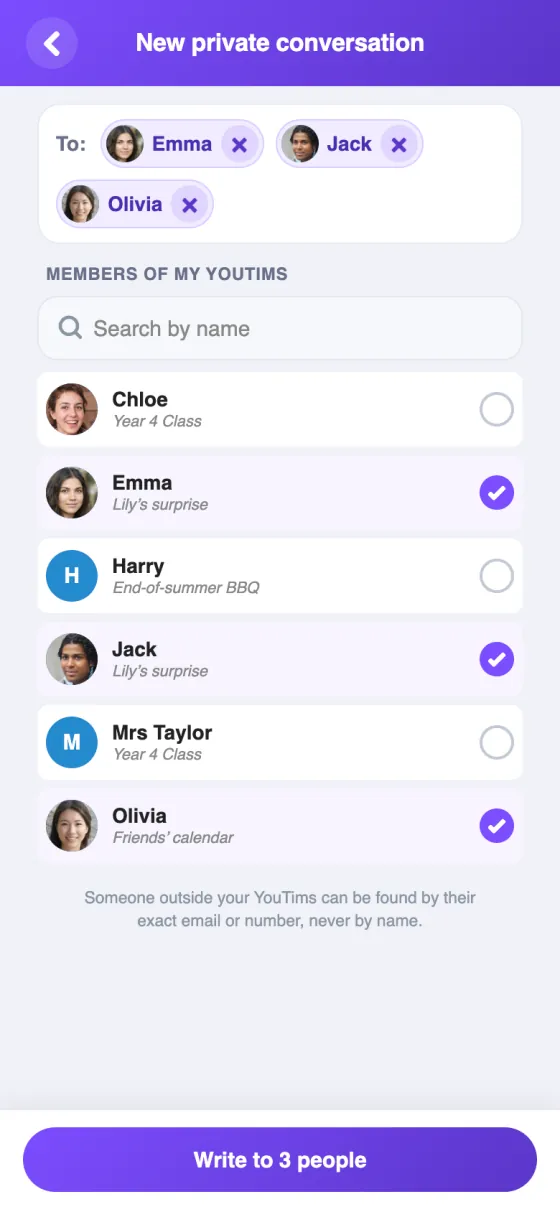
“New private conversation” screen in the app: Emma, Jack and Olivia selected
New private conversationSelect one or more people
Private conversation for 4 in the app: Emma, Jack, Olivia and you
GroupOnly the people in the conversation can see it
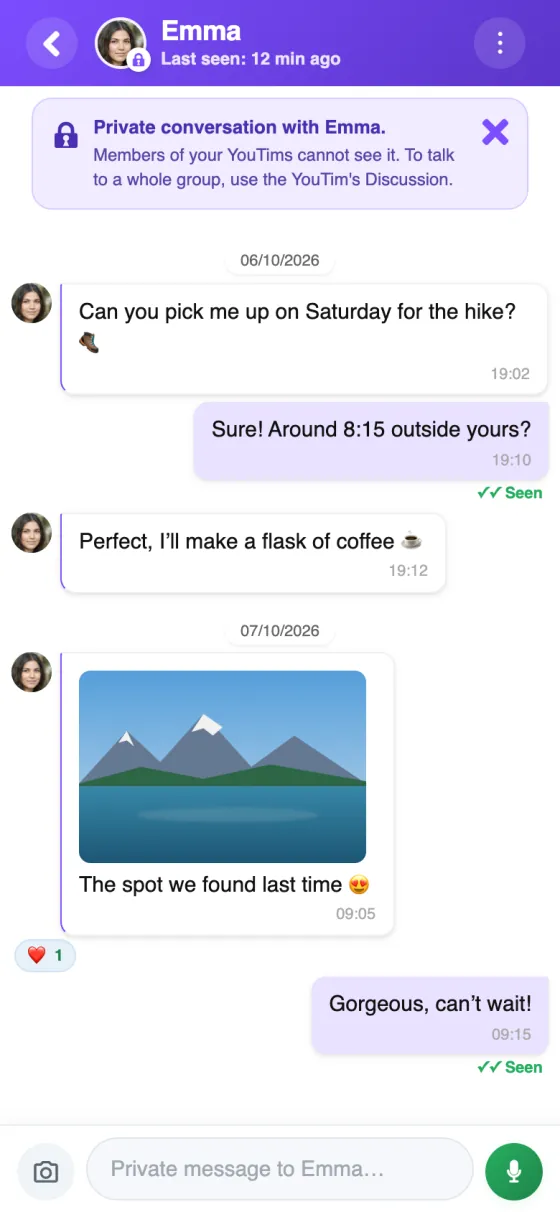
Private conversation with Emma in the app: messages, a photo and a reaction
One-to-onePhotos, reactions and voice notes, just like the group chat
  • 👥

    Up to 20 people

    A private conversation brings together 2 to 20 people, including you. No name to pick: its title is the participants’ first names.

  • 🔒

    Invisible to everyone else

    Only the people in the conversation can see it, not the other members of your YouTims.

  • ✉️

    Even outside your YouTims

    “Write to someone else”: by phone number or email. If they are not on YouTim yet, they get an invitation with your message.

  • ↩️

    Reply privately

    On a message in the group chat, “Reply privately” opens a conversation with its author, with the message quoted.

  • 🚀

    Create a YouTim with these people

    When the conversation turns into a project: calendar, expenses, lists… The participants are invited to the new YouTim.

  • 🛡️

    You choose who can message you

    Everyone, or only the members of your YouTims. You can also block someone or report a conversation.

YouTim Chat vs. classic messengers

Why a dedicated group chat beats just another WhatsApp, Telegram or Messenger group.

FeatureYouTim ChatWhatsApp groupTelegram / Messenger
Private group chat✓✓✓
Polls tied to same group✓ nativebasicbasic
Shared group calendar✓✗✗
Budget & expense splitting✓✗✗
Shared lists (shopping, tasks)✓✗✗
Collective photo gallery✓scatteredscattered
Ad-free, algorithm-free✓with WA Businessdepends
EU-hosted (GDPR)✓Meta (US)depends
No phone number required✓ email onlyrequiredoften required
Free, no in-app purchase✓✓✓

Comparison for informational purposes, based on publicly known 2026 features.

What YouTim Chat actually does

Six concrete scenarios where a private group chat makes daily life easier.

🏠

Coordinate daily family life

Who's picking up the kids tonight? Who's stopping at the pharmacy? With YouTim Chat, the family has its own dedicated channel — separate from the football mates group and work conversations. School photos stay in the family, daily reminders too.

And since the same group can enable Calendar, Shopping list and Budget, you no longer juggle five apps.

🎒

Organize a weekend with friends

Cabin booking, ride sharing, live photos from the chalet, the "who brings what" list: all in a private chat you can close after the trip. No more WhatsApp group lingering forever.

Pair it with Poll to choose the dates and Budget to split costs — the complete group-trip toolkit.

⚽

Run a sports club or association

Announce training, share last-minute changes, post the team photo. Club members join the YouTim with a simple 6-character invite code — no need to collect each phone number.

💼

Discuss a project with coworkers

For topics that don't belong on Slack or in email: leaving gift, common dinner, team lunch. YouTim Chat creates an off-the-record corner, without touching official work tools.

🎉

Prepare a wedding, birthday, bachelor/ette party

Major events generate hundreds of messages. A dedicated YouTim gives witnesses, the couple and organizers their own coordination channel — separate from the family and the guests. No spoiled surprise.

🏘️

Stay in touch with neighbors or your building

To report a broken elevator, organize a block party or chat with other residents: YouTim Chat offers a private neighborhood channel, accessible only to people invited by the admin.

Frequently asked questions

Is YouTim Chat really free?

Yes, completely free, with no subscription or in-app purchases, on iOS, Android and the web.

Are my messages private?

Yes: only the YouTim's members see them, and they are encrypted on our servers. No public profile, no search engine indexing, no data resale. A member who joins later only sees the messages posted after they joined, unless an admin gives them access to the history.

How is this different from a WhatsApp or Telegram group?

The chat is part of a YouTim that also brings together the group's tools — poll, calendar, budget, lists, gallery… — with the same members: you decide in the chat, then open the poll or the calendar without switching apps. And each circle (family, friends, club, colleagues) has its own space, instead of an endless list of conversations.

How many people can join a chat?

Up to 200 members per YouTim: enough for a family of 4 as well as an association with several dozen members.

How do I react to a message with an emoji?

Long-press the message (on a computer, click it): a palette of 6 emojis opens (👍 ❤️ 😂 😮 😢 🎉). Each person adds one reaction per message: choosing another emoji replaces it, choosing the same one removes it. Tap a reaction to see who reacted.

Can I share photos in the chat?

Yes: up to 10 photos per message, taken on the spot, picked from your phone or dragged in from your computer. They are reduced in size when sent so they load quickly, and all the photos in a conversation can be found in the “Photos” screen. New videos are not accepted.

Can I send voice messages?

Yes, up to 3 minutes per voice message, in the group chat as well as in private messages.

Can I edit or delete a message?

Yes. The author can edit the text of their message, which is then marked “edited”, or delete it; an admin can also delete a message. “This message was deleted” is shown in its place.

Can I reply to a specific message?

Yes: swipe the message to the right (or use its menu) to reply to it with a quote. You can also pin an important message so that it stays displayed at the top of the chat.

Can I see who has read a message?

Yes: under your messages, “Seen by” shows who has read them, and you can see when someone is typing.

Do I need to download an app to use the chat?

No. The chat works in your web browser, on a computer, tablet or mobile. The free app for iOS and Android adds push notifications.

How do notifications work?

With the app, a push notification alerts you to every new message; you can mute a chat's notifications. The daily email recap, if you have turned it on, also sums up the previous day's activity.

Can I limit who writes in the chat?

Yes. An admin can restrict writing to admins — handy for an information channel — or lock the chat.

Can I leave or delete a chat?

Yes. Each member can leave the YouTim from the YouTim's ⋮ menu on the home screen, deleting their messages along the way if they wish. An admin can remove the Chat service; only the creator can delete the entire YouTim.

How do I write privately to several people?

In “Chats”, tap “New private conversation” and select the people: up to 20, including you. Only they can see the conversation, not the other members of your YouTims. It has no name: its title is their first names. If a conversation with exactly these people already exists, YouTim opens it instead of creating another one.

Can I add someone to a private conversation?

No, the list of people is fixed when it is created. From the conversation, “New conversation from this one” selects the same people: add or remove some, and a new conversation starts, without the earlier messages; the old one stays as it is.

What happens if I delete a private conversation?

It leaves your list. One-to-one, the other person keeps theirs; if either of you writes again, the conversation comes back with the new messages only. In a group conversation, you leave it: the others carry on without you.

Why a YouTim chat instead of just another WhatsApp group?

General-purpose messengers mix every circle of your life: family, football mates, work, and that pizza-ordering thread from three years ago. YouTim keeps things cleanly separated. Each group has its own identity, and chat is tied to the group's other tools — polls, calendar, budget, lists. Decide in the chat, open the matching poll or calendar in the same group, no context switch.

Ad-free, algorithm-free

Messages display in the order they arrive. Nobody is trying to keep you hooked. Your data is never sold — YouTim is built in Europe and complies with GDPR.

On all your devices

Free apps on iOS and Android, plus a web app in your browser. Your conversations are the same on your phone and your computer: wherever you are, you find the whole exchange.

A European alternative to big-tech messaging

If you're looking for an alternative to WhatsApp, Messenger or Telegram for your group chats, YouTim is European-built, GDPR-compliant, and never targets you with ads. Your messages don't feed any recommendation algorithm or AI training.

Designed for real collective use

YouTim is not a social network. It's a group coordination tool where chat is part of a coherent set: polls to decide, shared calendar to plan, budget to split expenses, lists to organize, gallery to keep memories. A blended family, a volunteer team, a co-owners group or an amateur sports team find immediate use — no learning curve, no complex setup.

One group, multiple reusable services

When you create a YouTim, members are defined once. You can then add a chat, a calendar, a budget, a shopping list or a poll to the same group without re-inviting anyone. The opposite of a Trello + WhatsApp + Google Calendar + Splitwise stack: one place, one circle of people, multiple services.

Ready to create your first group?

Free, ad-free, in 30 seconds.