YouTim Service

The trip planner
for the whole group

Road trip, multi-day hike, family or friends trip: place the stops on the map, plan the trip day by day, pick a transport mode for each leg. Everyone sees the same trip.

Your whole trip in one place, shared with the group

Stops on the map, a day-by-day plan, notes, distances and durations by transport mode — for all participants.

  • 📍

    Ordered stops

    Each stop is a place, found by a search or a long press on the map; reorder them by dragging.

  • 📅

    Day by day

    Optional: the departure date and the nights spent at each stop. The app sorts the plan by day, with dates and the days spent in one place.

  • 📝

    A note per stop

    Times, meeting points, places to visit: a note under each stop, visible to all participants.

  • 🚗

    Six transport modes

    On foot, bike, car, train, boat or plane: one main mode, and a mode per leg if needed.

  • 🎨

    One colour per mode

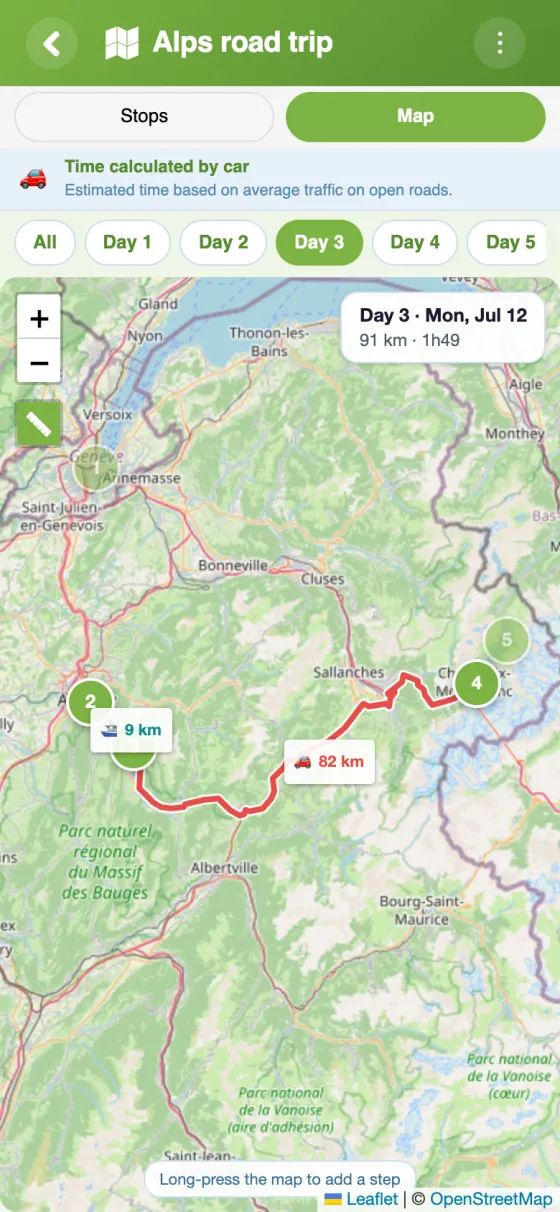
    On the map, each leg takes the colour and icon of its mode. A button shows the distances.

  • 📏

    Distances, durations and summary

    The time and distance of each leg and each day, then the trip summary: totals, days, nights and a breakdown by mode.

  • 🗺️

    GPX export and elevation

    The full route as a GPX file for your GPS or hiking app, and the elevation profile of walking and cycling legs.

  • 🔄

    Always up to date

    Plans change mid-trip? The itinerary can be edited at any time, and participants are notified when a stop is added or removed.

  • 💬

    Tied to chat and budget

    Discuss a stop, track expenses — all connected to the same group.

Trip planner

Your trip, day by day.

Turn on “Organise the trip by day”, set the departure date and the nights spent at each stop: the app sorts the stops by day, colours each leg by transport mode and sums up the trip.

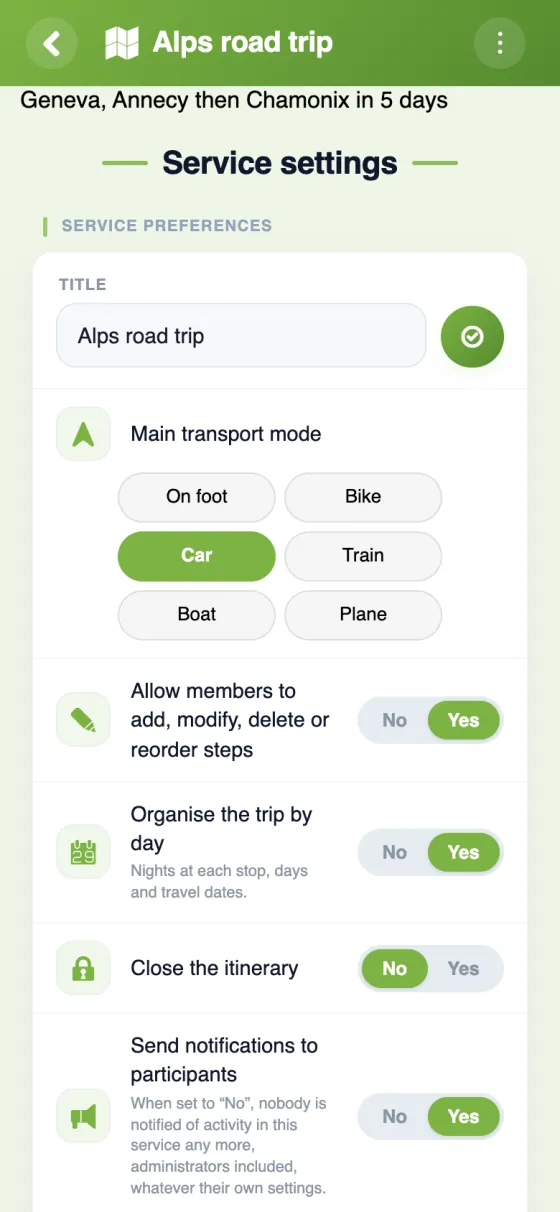
Itinerary settings in the app: main transport mode (on foot, bike, car, train, boat, plane) and the “Organise the trip by day” option
SettingsThe main transport mode and the “by day” option
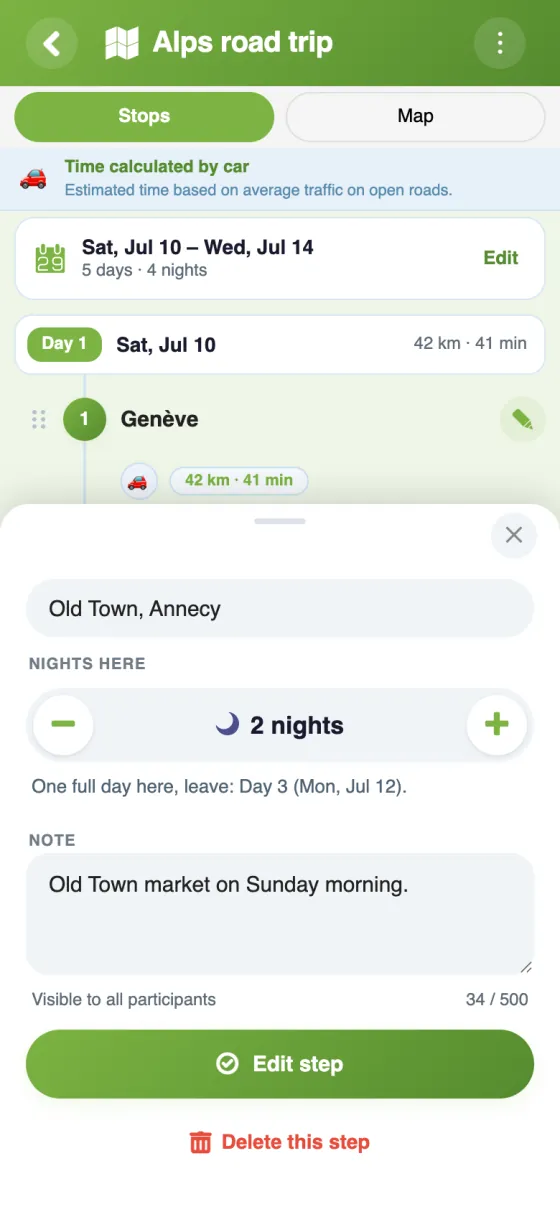
A stop's sheet in the app: nights here and a note
A stopNights here and a note, visible to everyone
Map of day 3 in the app: a boat leg then a car leg, with distances
Map of the dayOne day's legs, with their distances
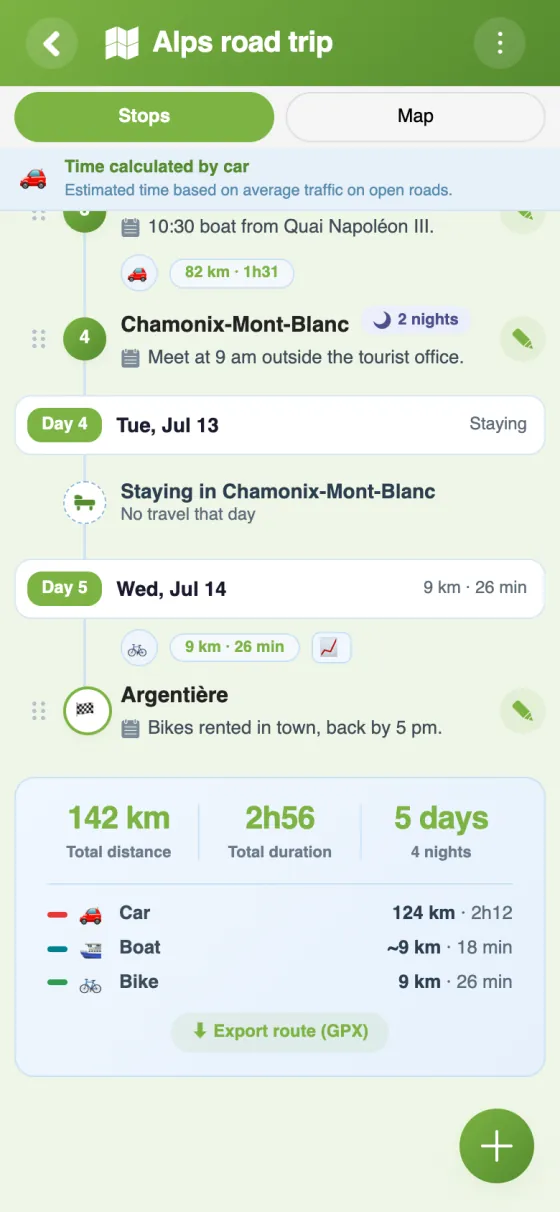
Trip summary in the app: 142 km, 2h56, 5 days, 4 nights, breakdown by car, boat and bike
SummaryDistance, duration, days, nights and breakdown by mode

How it works

A trip or outing, step by step.

Add the stops (one place each): they appear on a map, with the distance and duration of each leg. Everyone finds the plan without digging through messages.

Itinerary — Your stops, with distances and durations
Step 1Your stops, with distances and durations
Itinerary — The full route on the map
Step 2The full route on the map
Itinerary — Tap a stop to see its details
Step 3Tap a stop to see its details

YouTim Itinerary vs. other trip planners

FeatureYouTim ItineraryTripIt freeShared Google Maps
Group stages✓depends on planvia lists
No third-party account needed✓✗Google account
Tied to chat and budget✓✗✗
Multi-transport✓✓✓
Day-by-day plan✓✓✗
Editing together✓paid✓
Ad-free, no AI on your trips✓free tier✗
GDPR & EU✓USUS

Comparison for informational purposes, based on publicly known 2026 features.

What YouTim Itinerary actually does

🚗

The road trip with friends

5 cities in 10 days. Place each stop on the map and set the nights spent at each one: the app sorts the plan day by day, with dates and each day's route. Everyone checks it from their phone, even offline (the app keeps the last plan loaded).

🥾

A multi-day hike

Long-distance trail, Pyrenees crossing, Mont-Blanc tour: place the refuges on the map, check each leg's elevation and export the track as GPX. Ideal for a hiking group staying coordinated.

🚴

A cycling trip

EuroVelo, family bike trip: YouTim Itinerary structures the route day by day, with times counted at around 20 km/h and the elevation of each leg, and keeps everyone on the same page.

👨‍👩‍👧‍👦

The family road trip

Multiple cars, multiple stages, teens and grandparents: one shared itinerary prevents "where do we meet tonight?" at every stop.

⛴️

A trip with crossings

Greek islands, Corsica, a lake tour: the Boat mode draws each crossing with an estimated duration, alongside the car or train legs. Pair with Budget to split costs.

🏕️

Nature weekend or multi-spot bachelor/ette

Camping, gîte, restaurant, outdoor activity: the itinerary prevents weekend hesitations.

Get started in 30 seconds

1
Create your YouTim and add the Itinerary service.
2
Add your stops (a search or a long press on the map) and, if you like, the nights spent at each one.
3
The group consults the program from any device.

Frequently asked questions

Is YouTim Itinerary free?

Yes, completely free, with no in-app purchases and no ads.

What is the Itinerary service for?

It's the group's trip planner: you plan a trip or outing stop by stop. Each stop is a place, found with a search or by long-pressing the map. Everyone sees the same route, with the distance and duration of each leg and, if you like, the day-by-day plan.

Which transport modes can I choose?

On foot, bike, car, train, boat or plane: the main mode is chosen at creation, and each leg between two stops can have its own. On the map, each mode has its own colour and icon. Distances and durations follow roads and paths for car, bike and walking (by bike, time is counted at around 20 km/h); for train, boat and plane, they are estimated as the crow flies.

Can I plan the trip day by day?

Yes, it's an option: “Organise the trip by day”, at creation or in the service settings. Set the departure date and the number of nights spent at each stop: the app sorts the stops by day, with dates, the days spent in one place and each day's distance. On the map, one chip per day shows only that day's legs. Without the option, the itinerary stays a simple list of stops.

Can I add a note to a stop?

Yes, one note per stop, up to 500 characters: times, meeting points, places to visit… It appears under the stop's name and in its bubble on the map, for all participants.

Where can I see distances and the trip summary?

In the list, each leg shows its distance and duration. On the map, the ruler button shows distances on the routes. At the bottom of the list, the summary gives the total distance and duration, the number of days and nights if the trip is organised by day, and a breakdown by transport mode when it combines several.

How is this different from TripIt or shared Google Maps?

The itinerary is built into the YouTim that also shares the chat, budget and gallery. The members are already invited, so there's no need to forward a link to each of them.

Can I add stops after departure?

Yes, the itinerary can be edited at any time. By default, all members can add, edit or reorder stops; the admin can restrict this to admins or lock the itinerary.

Can I export the route?

Yes, as a GPX file, for a GPS or a hiking app. For walking and cycling legs, an elevation profile also shows the climbs.

Is the itinerary private?

Yes, only the YouTim's members see the itinerary. Stops and notes are encrypted on our servers, in Europe. No public indexing, no resale.

Group trip planner: the integrated solution

Planning a trip together means juggling stops, routes, dates and meeting times. Specialized apps (TripIt, Roadtrippers, Sygic Travel) cover part of the need but force you to export and share on every change, and each participant must create a third-party account. YouTim Itinerary is built into the group's YouTim: travelers are already invited, and the plan is the same for everyone, always up to date.

A day-by-day plan

With the “Organise the trip by day” option, the planner spreads the stops over the days of the trip from the departure date and the nights spent at each stop: each day's route and the days spent in one place are visible at a glance. A note per stop keeps times and meeting points.

For road trips and car trips

A multi-stage trip needs a clear thread: which way do we go, how far today, how long on the road. YouTim Itinerary shows it on the map, accessible to everyone from their phone.

For multi-day hikes

Long-distance trails, Camino, alpine crossings: for multi-day group hikes, placing refuges and resupply points on the map, with each leg's distance and elevation, keeps even a large amateur group coordinated.

Combined with other group services

The itinerary makes full sense with the calendar (pre-flight reminders), budget (cost splitting), gallery (road photos), and chat (day-to-day coordination).

GDPR & EU hosting

Your itinerary feeds no recommendation algorithm, no targeted advertising. Trip data stays private to the group, in Europe.

Plan your next group trip

Free, ad-free, in 30 seconds.