Use case · Lists
The shared shopping list app
the whole household fills in
Everyone adds what's missing as soon as they notice, whoever's at the shop ticks it off. It even works without signal in the aisle, free and ad-free.
What a shared shopping list changes
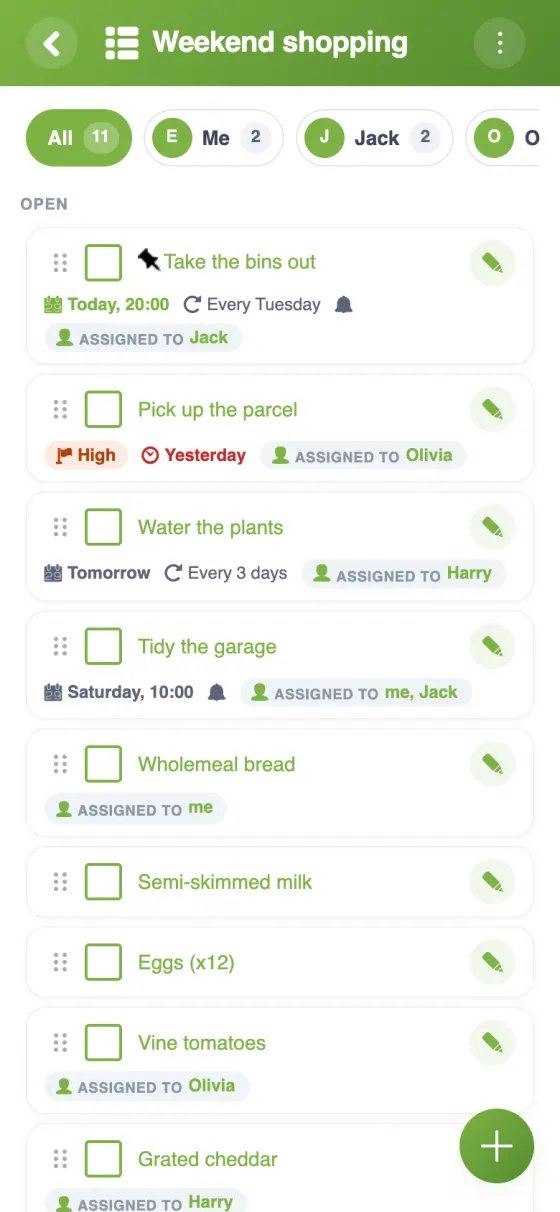
One list for the household, always the right one.
- 🛒
Everyone adds
Mum, the kids, the flatmates: whoever finishes the milk adds it, from their phone or a browser.
- ✔️
The shopper ticks off
At the shop, you tick items as they go in the trolley; the others see what's already done.
- 📶
Works offline
No signal at the back of the supermarket? Add and tick anyway: changes are sent once you're back online.
- 📷
A photo when it matters
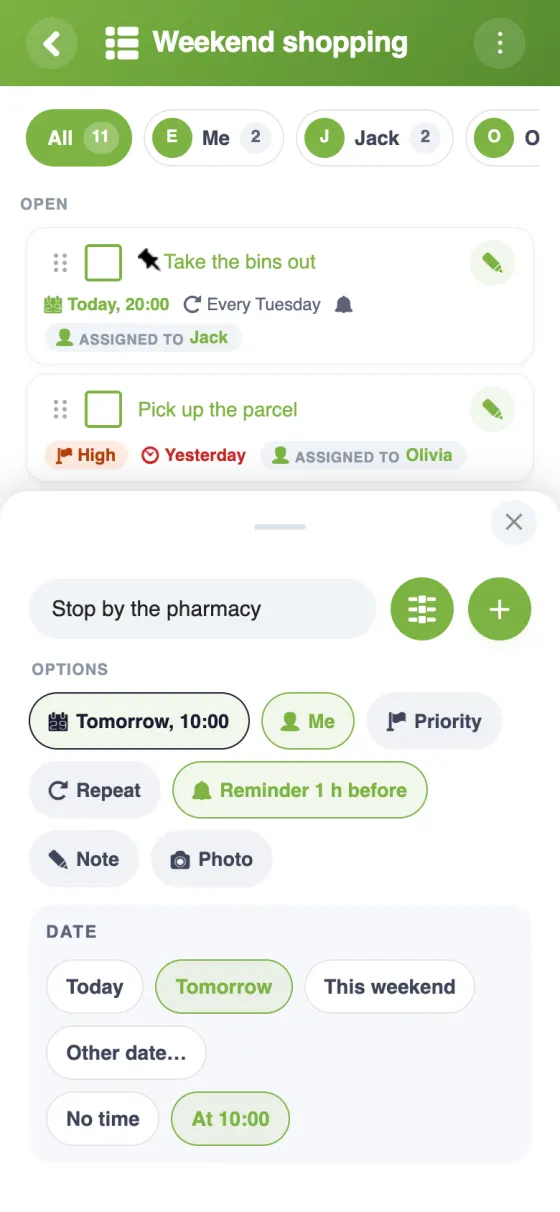
Attach a photo to an item: the right brand of nappies, the exact box of cereal.
- 📋
One list per need
Weekly shop, chemist, DIY: add several lists to the same YouTim.
- 🔔
A reminder if needed
Give an item a date and a reminder: order the birthday cake by Friday.
The shared shopping list in YouTim
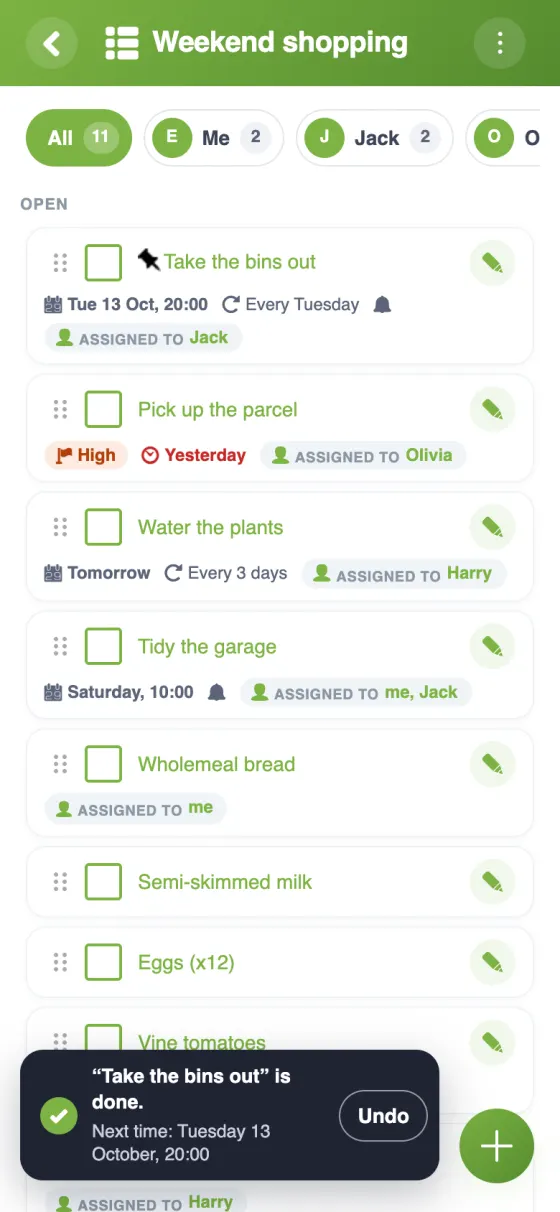
The filter by person, an item's options and what comes back by itself.
Set up a shared grocery list in a minute
A collaborative grocery list for families and flatmates
The fridge runs out of something, someone says “I'll remember”, and nobody does. A shared shopping list app closes the gap between noticing and buying: the person who spots it adds it, the person at the shop sees it. In YouTim, that list sits in your household's private space, next to the chat and the calendar.
A free shared shopping list app, with no ads
YouTim Lists is free, with no ads and no in-app purchases, on iPhone, Android and in any browser. In the app, an item added at home appears for the person at the shop; on the web, the list updates when you come back to the page.
A family shopping list app everyone can use
Children can add their lunchbox requests, grandparents can check the list from a computer. By default, every member adds, edits, ticks and deletes items; an admin can keep those rights for admins or lock the list.
For the family's dates and appointments, the family calendar lives in the same YouTim.
A shopping list app for couples and flatmates
For two, one list is usually enough: whoever passes the shop picks things up. In a flatshare, you can keep a shared list for the basics, loo roll and washing-up liquid, and let each person handle their own food. Flatmates also use the same YouTim for the household chores and shared bills; see YouTim for flatshares.
What to look for in a shared shopping list app
A good shared list does three things well: anyone can add to it in seconds, it keeps working when the signal drops in the aisle, and it doesn't need yet another group to set up. With YouTim, the members are already there, the list works offline, and each item can carry a photo, a date with a reminder and several people in charge.
Frequently asked questions
Is the shared shopping list free?
Yes, completely free, with no ads and no in-app purchases, on iPhone, Android and the web.
Can several people add to the list at the same time?
Yes. In the app, when someone adds or ticks off an item, the list updates for everyone else. On the web, it updates when you come back to the page.
Does the list work in a shop with no signal?
Yes: without a connection, you can add, tick off, rename or reorder items. Everything is sent automatically once the network is back.
Can we have separate lists for different shops?
Yes, you can add several lists to the same YouTim, for example one for the weekly shop and one for the chemist. Each list holds up to 100 items.
Can someone without an account see the list?
Yes, with a view-only link: an admin turns on “Share as view-only” and sends it. The person sees the items in their browser, without an account, but can't tick or change anything.
Do I need a phone number to sign up?
No. An email address is enough, or you can sign in with Google or Apple.
 YouTim
Your whole group in one place.