Use case · Gallery
The wedding photo app
your guests will actually use
Guests scan a QR code, join your wedding's private album and add their photos from the dance floor. The morning after, the album is waiting for you.
Every guest's photos, in one place
A shared album that guests can join in seconds.
- 📱
Join with a QR code
Put your YouTim's QR code on the tables or the order of service: guests scan it and join.
- 📸
Everyone uploads
Guests add photos from their camera roll, or take them on the spot, during and after the party.
- 🗂️
Pages for each moment
Ceremony, drinks reception, dinner, first dance: an admin sorts photos into pages.
- ⬇️
Download in one go
On a computer, select the photos you want and download them as a ZIP file.
- 🔒
A private album
Only the people in your wedding's YouTim see the photos. Nothing is indexed publicly.
- 🔗
For those who couldn't come
Share a view-only link with relatives far away: no account needed to browse.
Your wedding album in YouTim
All the photos sorted by pages, filtered in one tap, and saved with ease.
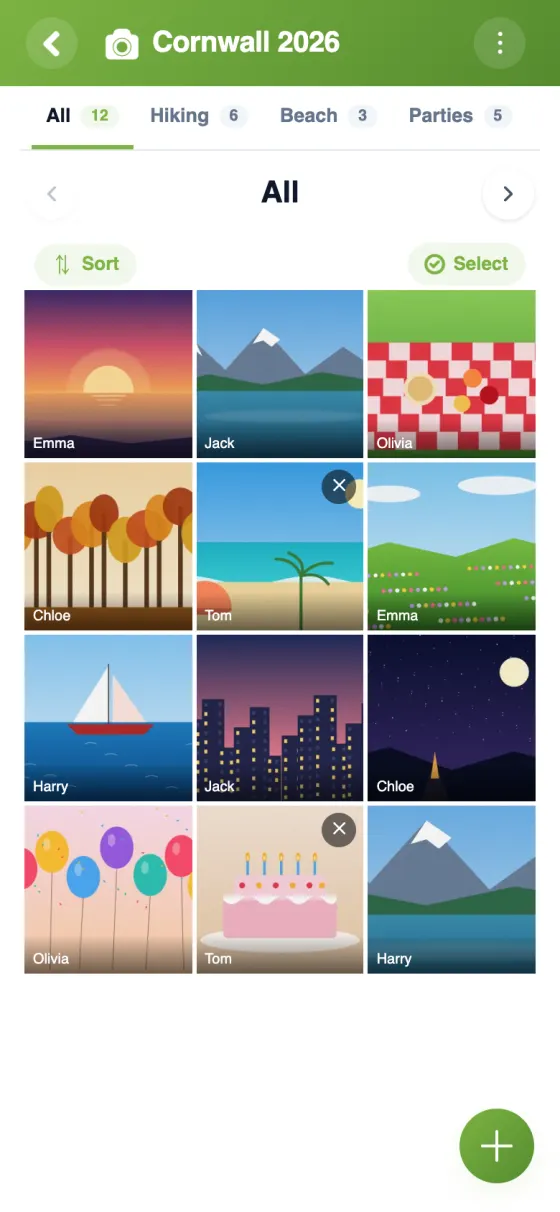


Set up wedding photo sharing in 10 minutes
Wedding guest photo sharing, without the hassle
Your guests take hundreds of photos you'll never see: candid shots, the speeches, the dance floor at 1 a.m. A shared album for the wedding gathers them in one place while everyone still has them on their phone.
A free wedding photo sharing app
YouTim is free, with no ads and no in-app purchases, on iPhone, Android and in a web browser. There's no paid plan to unlock more guests: up to 200 members can join a YouTim. Each guest's uploads count towards their own 1 GB of storage, about 2,000 photos once they're reduced for sharing.
Upload wedding photos from guests, during and after the party
Guests add photos straight from their phone's camera roll, take them on the spot, or add them from a computer once they're home. Everyone sees the album grow and can save the photos they like. When the last photos are in, an admin can lock the gallery to stop new additions.
A shared photo album for your wedding, kept private
The album is visible only to the members of your wedding's YouTim. Photos are encrypted on our servers, never indexed publicly, never sold and never used to train AI. Anyone with the invitation code or QR code can join, so share them only with your guests.
For grandparents or friends who couldn't make it, an admin can turn on “Share as view-only” and send a link: they browse the photos in their browser, without an account, and can't change anything.
Collect wedding guest photos, then keep the best
Pages help everyone find their way: “Ceremony”, “Speeches”, “Party”, with the “All” page bringing everything together. On a computer, select the photos you want and download them as a ZIP file. Planning the rest of the day? The same YouTim can hold a shared checklist, and our weddings and events page shows what else it can do.
Frequently asked questions
How do guests upload their wedding photos?
They join your wedding's YouTim with the invitation link, code or QR code, then add photos to the gallery from their phone or computer. An email address is enough to create an account; no phone number is needed.
Is it really free?
Yes. YouTim is free, with no ads and no in-app purchases, however many guests you have, up to 200 members per YouTim.
Can guests upload videos?
No. The gallery accepts photos only.
Can we download all the wedding photos?
Yes. On a computer, select several photos (or drag across them with the mouse) and download them in one go as a ZIP file. On a phone, photos save to Photos on iPhone or to Downloads on Android. The saved version is the reduced one shared with the group.
Who can see our wedding album?
Only the members of your YouTim. An admin can also share a view-only link with people who don't use YouTim, and turn it off at any time.
Can we stop people adding photos after the wedding?
Yes: an admin can lock the gallery to stop new additions. Admins can also delete any photo.
 YouTim
Your whole group in one place.