Use case · Gallery
A family album app
for the photos that matter
Share photos of the kids with grandparents, aunts and cousins in one private album, sorted by year or by occasion. No social media, no ads.
Why families use a shared album
One album, added to by everyone, seen only by the family.
- 👵
Grandparents included
They can join with just an email address, on a phone or in a web browser.
- 📸
Everyone adds photos
Parents, uncles and cousins all add their photos to the same album.
- 🗂️
Sorted by year or occasion
An admin creates pages such as “2026”, “Christmas” or “Summer holiday” and files photos in them.
- 🔒
Private by default
Only family members see the photos. No public profile, no algorithm.
- ⬇️
Easy to keep
Save a photo to your phone, or download a whole selection at once as a ZIP on a computer.
- 🔗
View-only link
Show the album to someone without an account, with a link an admin can turn off at any time.
The family album in YouTim
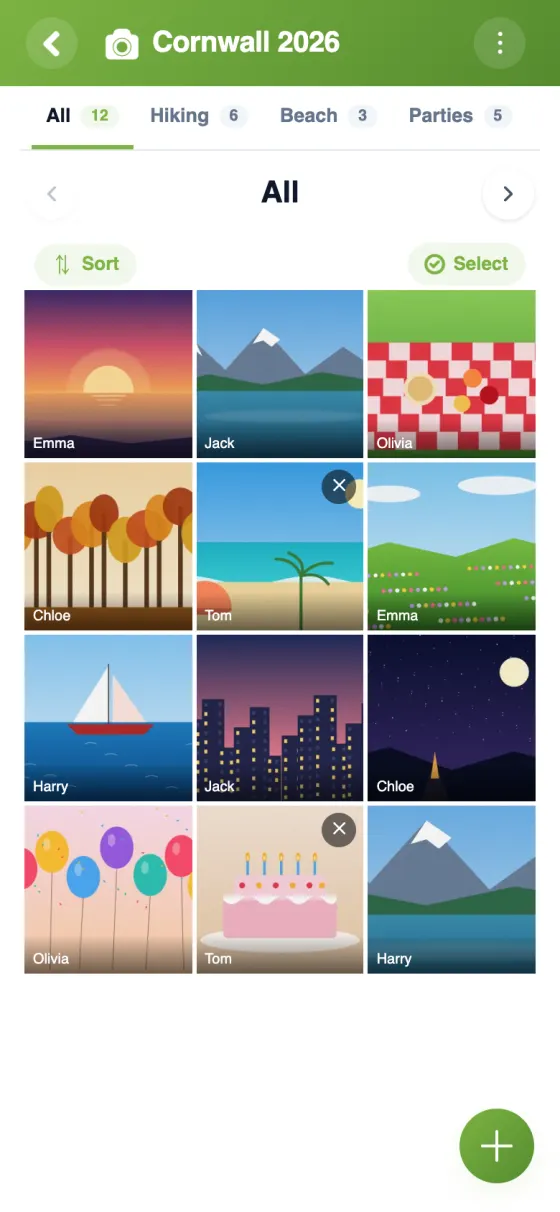
Photos sorted by pages, filtered in one tap and viewed full screen.


Start your family photo album in 5 minutes
A family photo sharing app without social media
Photos of the kids end up spread across phones, group chats and social networks. A family album app puts them in one private place that the whole family can add to, and that grandparents can browse at their own pace.
A free family photo sharing app, with no ads
The YouTim gallery is free, with no ads, no subscription and no in-app purchases. It runs on iPhone, Android and in any web browser, so a grandparent can look through the photos on a laptop or tablet without installing anything. Each person gets 1 GB of storage; photos are reduced in size when uploaded, which works out at roughly 2,000 photos each.
The best way to share photos with family privately
Only the members of your family's YouTim can see the album. Photos are encrypted on our servers, never indexed publicly, never sold and never used to train AI. Nobody needs a Google or Apple account to join.
For a relative who would rather not sign up, an admin can turn on “Share as view-only” and send a link: they see the photos in their browser but can't change anything, and nicknames are hidden by default. While the link is active, every member sees an eye next to the gallery's title.
A family photo album organised by year or event
An admin creates pages, for example “2026”, “Granny's 80th” or “Beach holiday”, and files photos into them; the “All” page keeps everything together. One tap on a page filters the album. To file or download lots of photos at once, tap “Select” and slide your finger across the thumbnails.
For the rest of family life, from dentist appointments to birthdays, see the family calendar and our family organiser app page.
Frequently asked questions
Is the YouTim family album free?
Yes, completely free, with no ads, no subscription and no in-app purchases, on iPhone, Android and the web.
Do grandparents need a smartphone?
No. They can open the album in any web browser, with an account created from an email address. An admin can also send them a view-only link that works without an account.
Who can add photos to the family album?
Every member of the family's YouTim. An admin can lock the album when it's complete, and a photo can be removed by whoever added it or by an admin.
Can we download the photos?
Yes: on iPhone they're saved to Photos, on Android to Downloads. On a computer, you can select several and download them in one go as a ZIP file. The saved version is the reduced one shared with the group.
Can we add videos?
No. The gallery is made for photos, and videos can't be uploaded to it.
Are our family photos used for anything else?
No. They're visible only to your YouTim's members, encrypted on our servers, never sold and never used to train AI.
 YouTim
Your whole group in one place.