Use case · Budget
The split rent app
for flatmates who like things fair
Rent, energy, broadband and the weekly shop: everyone logs what they paid, shares follow the size of each room, and YouTim works out who owes whom.
Shared costs, without the spreadsheet
Rent and bills in one place, with balances everyone can see.
- 🏠
Fair shares by room
Split the rent in shares, adjustable by half-share: 1.5 for the big room, 1 for the others.
- 💷
Fixed amounts too
Give someone a set amount and let the others split the rest in shares.
- 📊
Up-to-date balances
Each expense updates every flatmate's balance. No more sums on the back of an envelope.
- 🔄
Fewer transfers
YouTim suggests who pays back whom, keeping the number of transfers down.
- 📎
Receipts attached
A photo of the bill or a file can be attached to each expense.
- 💳
A “Pay” button
If a flatmate has added their Revolut or PayPal, “Pay” opens their payment link.
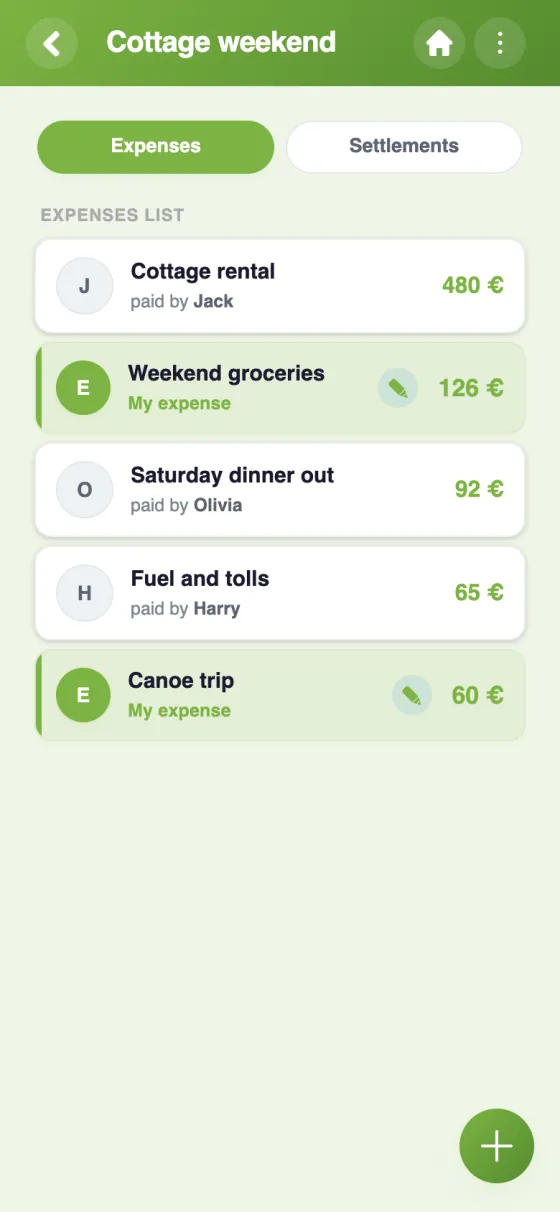
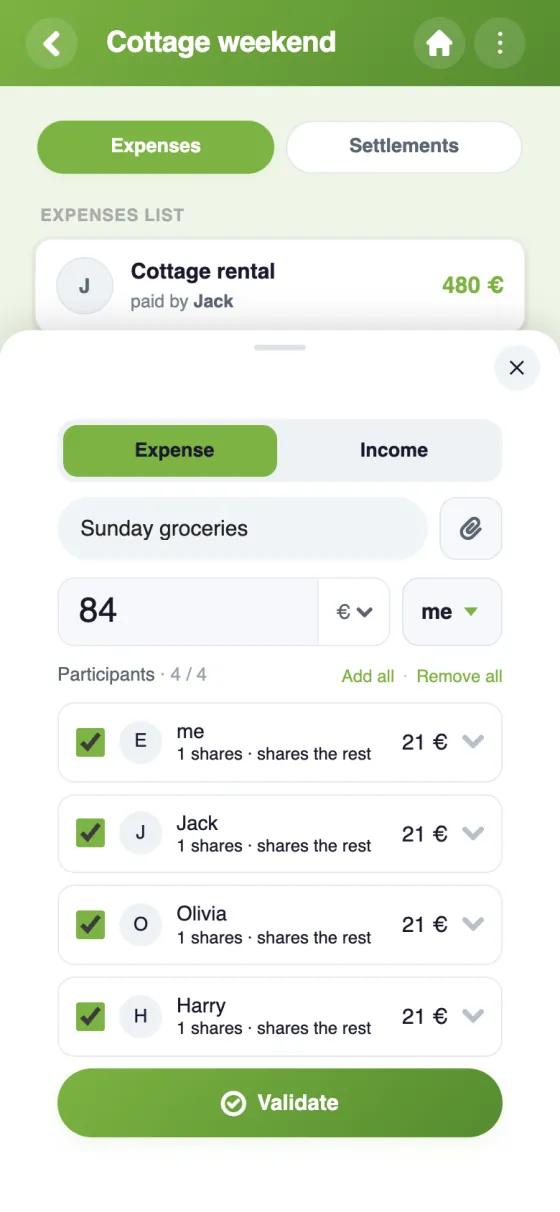
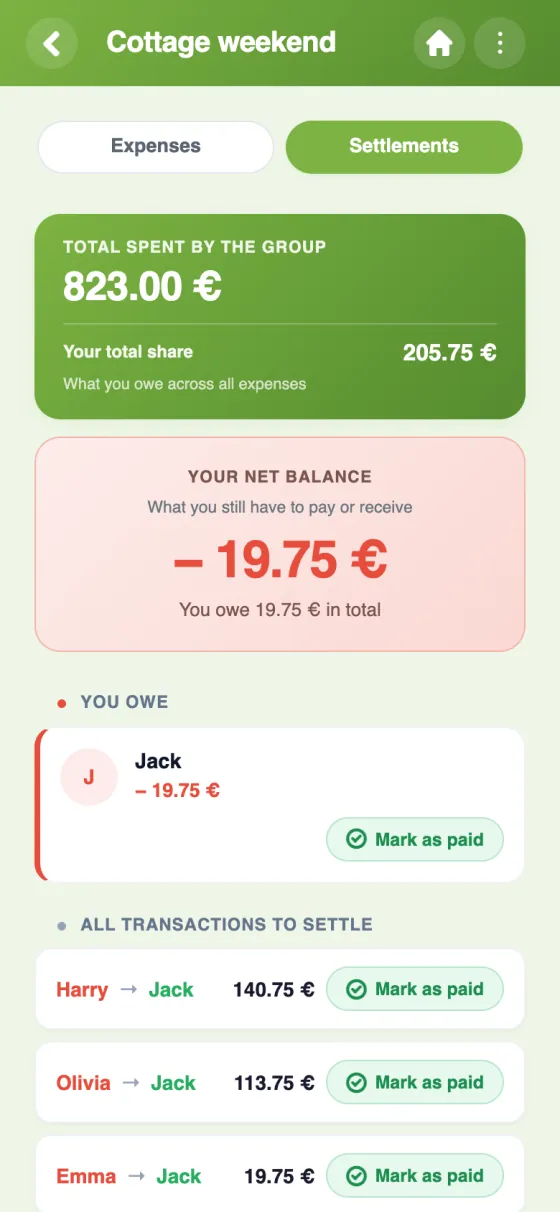
Splitting the flat's costs in YouTim
All the expenses, adding a new one, and who owes how much to whom.
Set up your flat's budget in 5 minutes
Split bills with flatmates, fairly
Living together means a steady stream of shared costs: rent, council tax, energy, broadband, cleaning products, the weekly shop. A split rent app keeps them in one place, so nobody has to remember who paid the last electricity bill.
Split rent by room size
Rooms are rarely equal. In YouTim, each expense is split in shares, 1 by default and adjustable by half-share, or as fixed amounts. For a £1,750 rent with one large room and two smaller ones, give the large room 1.5 shares and the others 1 each: that's £750, £500 and £500. Or set one flatmate at a fixed £700 and let the other two split the remaining £1,050 in shares.
The same goes for bills: a partner who stays most nights can take a share of the energy bill, and someone away for a month can be left out of the groceries.
A bill splitting app for roommates, with balances
Each flatmate adds what they paid, how much and for whom. YouTim keeps everyone's balance up to date and suggests who should pay back whom, with as few transfers as possible. Once a repayment is made, it's marked as paid by either flatmate or an admin. If the person to repay has added their Revolut or PayPal, the “Pay” button opens their payment link; YouTim never handles the money itself.
Bought something abroad? Expenses can be entered in more than 160 currencies and are converted at the day's rate.
A roommate expense tracker next to the chores
A photo of the receipt can be attached to each expense, which settles most “did you really pay that?” debates. And the flat's YouTim isn't just a budget: the same members share a shared list for the shopping and the chores, plus a group chat for everything else. See how it fits together on our flatshare page.
Frequently asked questions
Is the YouTim split rent app free?
Yes, entirely free, with no in-app purchases and no ads.
Can we split the rent unequally?
Yes. For each expense, choose who takes part and each person's share: in shares (1 by default, adjustable by half-share) or as a fixed amount. The two can be combined: those on shares split what's left.
Can I pay my flatmate from the app?
YouTim never handles the money. If the flatmate you owe has added their Revolut or PayPal, the “Pay” button opens their payment link; otherwise, pay them as usual and mark the repayment as paid.
Which currency does it use?
The budget has a main currency (pound sterling, euro, dollar or Swiss franc), which the admin can change later. Each expense can be entered in one of more than 160 currencies and is converted at the day's rate.
Who can add or edit an expense?
Each flatmate adds the expenses they paid; an expense can be edited or deleted by the person who paid it or by an admin. An admin can also lock the budget.
Can we track the shopping and chores too?
Yes. Add the Lists service to the same YouTim: an item can be assigned to a flatmate, repeat every week and come with a reminder.
 YouTim
Your whole group in one place.